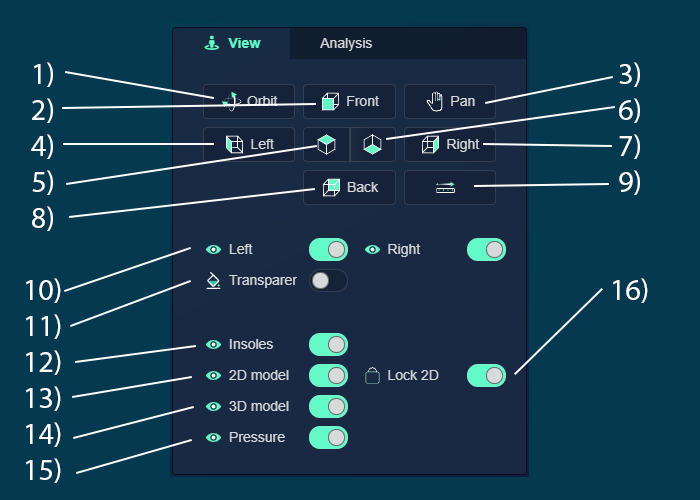
Navigation and View Controls
- Orbit: Rotate around the product
- Front View: View from the front
- Pan: Move the screen around
- Left View: View from the left side
- Top View: View from above
- Bottom View: View from below
- Right View: View from the right side
- Back View: View from the rear
- Measuring Tool: Measure distance between points A and B
Display Controls
- Show/Hide All: Toggle visibility of all elements on left/right
- Transparent View: Enable see-through view of the product
- Show/Hide Insoles: Toggle visibility of insoles
- Show/Hide 2D Scans: Control display of 2D scan data
- Show/Hide 3D Scans: Manage visibility of 3D scan information
- Show/Hide Pressure Data: Toggle display of pressure data overlays
- Lock 2D Scans: Prevent accidental selection/movement of 2D scans
Orbit
Pan
Hide scans
Hide insole
Hide side
View direction
Lock 2D scans
Measure