2. Design
The Design tab offers comprehensive options for customizing your orthotic device, including dimensions, corrections, and personalization features.
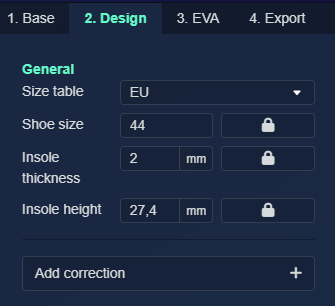
Size Table
Standard options:
- EU
- US Men
- US Women
- UK
- Millimeters
Add custom size tables from the library menu.
Shoe Size
Set shoe size based on the selected size table.
The right input has a lock icon. When clicked, it unlocks to allow setting different sizes for left and right feet.
Insole Thickness
Define the base thickness.
The right input has a lock icon. When clicked, it unlocks to allow setting different thicknesses for left and right feet.
Insole Height
Set the device height.
Automatically set when using 3D scan with Full Contact and Prefab 3D options. Without a 3D scan, height remains constant.
Enable height scaling based on shoe size in library settings.
The right input has a lock icon. When clicked, it unlocks to allow setting different heights for left and right feet.
Corrections, Modifications and Customization
Add Correction +
Opens a list of automated corrections and options to add text and logos.

Click the heart symbol behind any correction to favorite it for future designs. Click again to remove from favorites.
Pronation
Lifts the lateral side of the device.
- Region: Entire insole, Forefoot, or Rearfoot
- Correction: Adjustment value in mm or degrees

Supination
Lifts the medial side of the device.
- Region: Entire insole, Forefoot, or Rearfoot
- Correction: Adjustment value in mm or degrees

Flatten Front Foot
Flattens the front foot area.

Only visible for full length devices.
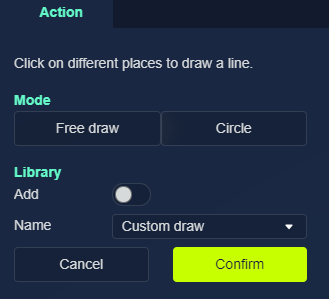
Cut Out
Medial Arch Correction
Adjusts arch height:
- Positive value: Increases height
- Negative value: Lowers height

Medial Flange
Creates a medial flange.

Lateral Flange
Creates a lateral flange.

Move Apex
Adjusts the highest point of the arch:
- Positive value: Moves forward
- Negative value: Moves rearward

Heel Lift
Elevates the heel. Total heel thickness = insole thickness + heel lift.
- Length: Distance over which the lift transitions
- Height: Lift height in millimeters

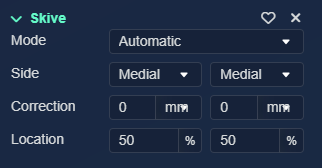
Skive
Adds a Kirby skive.
- Mode: Automatic or Manual (using a movable plane)
- Side: Medial or lateral
- Correction: Height in mm or degrees
- Location: Starting position (higher number = more lateral)
Heel Cup Depth
Sets heel cup height in millimeters.

Heel Width Correction
Modifies heel width.
- Mode:
- Correction: Widens (positive) or narrows (negative)
- Desired Width: Sets specific width
- Heel Width Value: Correction or desired width

Compress
Reduces total height by specified percentage.
Useful with full contact designs from impression boxes to reduce excessive height.

Insole Width
Sets specific insole width.

Smooth
Applies overall smoothing a specified number of times.
Smooth Region
Draw a specific area for targeted smoothing.
Deform Region
Draw an ellipse and adjust its height:
- Positive value: Adds material
- Negative value: Removes material
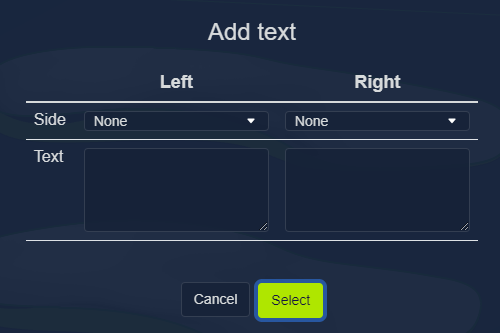
Add Text
Add text to your design:
- Choose side placement
- Enter text content
Text added as movable object.
Add Logo
Add logo to plantar side.
Logos must be added to library before use.