How-to: IdeaFormer
Belt-printer-specific questions and fixes for the IdeaFormer. For general 3D printing questions (print conditions, wet filament, nozzle clogging), see 3D printing.
Belt printer management
| Rule | What can go wrong if ignored | What may need replacing |
|---|---|---|
| Preheat nozzle before nozzle change. | Stripped threads, leaks, damage. | Full hotend |
| Hold the hotend with a wrench during nozzle change. | Twisted/broken hotend; leaks; wire damage. | Full hotend |
| Clean the nozzle | Strings/blobs. Misprints; failed ejection. | Belt, Full hotend |
| Set & verify Y-offset (peel alignment). | Collisions; seam/edge damage; failed ejection. | Belt, Full hotend |
| Let parts roll off; jog to peel, no yanking. | Belt bend/seam damage; skipped steps. | Belt |
| Load/change filament without heating the belt. | Belt wear; inconsistent adhesion. | Belt |
| Check belt tracking before long runs. | Edge fray; rubbing; skewed prints. | Belt |
| Don't use metal tools on the belt. | Cuts/nicks; damaged seam; jams. | Belt |
| Don't over-tension the belt; align rollers/idlers. | Binding; step loss; seam separation. | Belt |
| Scraper as close to the belt as possible but not against it. | Too far off; the product won't come off / Too close; the belt will break. | Belt |
| Preheat nozzle before load/unload filament. | Filament won't melt; jams; extruder strain. | Extruder |
"What may need replacing" is not limited to the noted product.
The conductors of the belt printer must be lubricated regularly.
-
If you don't lubricate the belt printer conductors, which are the linear rails, rods, and lead screws that the printer's motion system uses, you risk causing noise, decreased print quality, and premature wear on moving parts.
-
Check the scraper after changing or adjusting the belt itself.
Why did the layers of my 3D print shift?
- Check if the belt is moving correctly and centered.
- Check if the belt rail needs to be lubricated.
- Check the Axis of the printer.
- Check if the motor isn't blocked.
Why does the belt run off the printer?
On the print bed: Regularly check the flatness of the print bed.
Ensure the correct distance between the bed and the nozzle, for optimal adhesion of the first layer of filament.
You will see if the belt starts to run off or is off center.
Why is my print coming off, or not coming off, the belt?
- The bed is not level.
- The nozzle is too far from, or too close to, the print surface.
How to fix this issue?
- Go to your browser.
- Type in the IP address of the printer.
- Calibrate the offset / move the Y-Axis up or down.
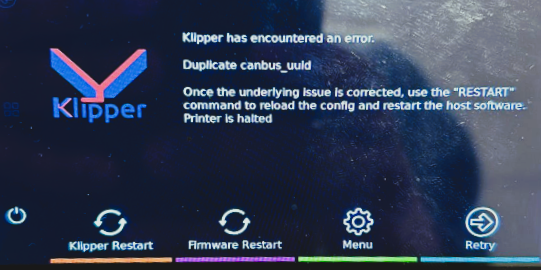
What does the "Duplicate canbus" error mean?
If you see the following message "Duplicate canbus_uuid", the cable of the printhead came loose.
Please adjust this and continue.